
Maho vs SigmaOS: two macOS-native power browsers
SigmaOS shipped before most of the new browsers. It is one of the better examples of “we know macOS, we know power users, we will not pretend to be Chrome with a tab bar”. Maho is in the same neighborhood. Both browsers reject the universal tab bar design. Both want to feel like a Mac app, not a port. Both ship for keyboard-first users who treat the browser like a workspace.
The point of this post is the diverge. Where SigmaOS goes, where Maho goes, and which one fits which user. We have used SigmaOS as our daily for a stretch. The strengths are real. The ceilings are real too.
SigmaOS’s design philosophy
Section titled “SigmaOS’s design philosophy”SigmaOS reads as the answer to “what would a Mac-native power browser look like if you let designers run the project”. Workspaces are first-class. Tabs are ephemeral things that snap back to their workspace. Keyboard shortcuts are first, not bolted on. Snooze a tab and it returns at the time you said.
The product position is closer to a productivity app than a browser. The Cmd-K bar is the home for everything: switch workspaces, run commands, search history. The visual identity is opinionated and consistent. Everything looks like SigmaOS, including the websites you open inside it.
The trade is also clear. SigmaOS is one team’s interpretation of how a power browser should feel. There is one workspace model. There is one chrome. There is one way to do AI. If the interpretation fits, the product is a joy. If it does not, you bounce. The product is not trying to be everything to everyone, which we respect.
We have spent enough time in SigmaOS to know what makes it sticky. The keyboard layer is the strongest of any non-Vimium browser. The split-view is genuinely better than what Chromium ships. The visual quiet of the chrome makes long sessions less tiring. None of these are small wins. They are also not the wins we built Maho to chase.
Maho’s design philosophy
Section titled “Maho’s design philosophy”Maho’s bet is a different one. We start from a Chromium engine and a clean macOS-native shell. The shell looks like a Mac app. The engine is the same engine that runs Chrome. We do not reinvent the rendering layer to ship a different chrome.
The Maho axis is not “design opinion”. It is agency. The browser exposes a small set of tools to a model the user controls. The user can swap the model with their own API key. Every action the assistant takes goes through a permission gate the user can audit. The opinion is about who is in charge of the tab, not about what color the tab is.
Both browsers are macOS-native. Both reject Chrome’s tab bar. The difference is what each one optimizes after that. SigmaOS optimizes the chrome. Maho optimizes the agent.
A second difference shows up in extension support. Maho keeps Chrome’s extension surface intact. The extensions you already use work in Maho the same way they work in Chrome. SigmaOS narrows the surface in service of its own design. Both choices are coherent. The cost lands on different users.
Workspace model: workspaces vs Spaces
Section titled “Workspace model: workspaces vs Spaces”SigmaOS calls them workspaces. Maho calls them Spaces. Both are containers that hold tabs. The capability looks similar at a glance. The behavior under the hood is not.
A SigmaOS workspace is a sandboxed bundle of tabs and settings. Profile separation is per-workspace. Tabs in one workspace cannot see cookies in another. Switching is fast. Renaming is a click. The split-view inside a workspace is a strong feature, with two tabs visible at once and synced scrolling on demand.
A Maho Space is a sandboxed bundle of tabs, with the same profile-separation guarantee, plus per-Space settings for the AI tools the assistant can call. A Space scoped to “work” can grant create_issue on linear.app for the session. A Space scoped to “personal” never sees that grant. Permissions follow Spaces, not the global profile.
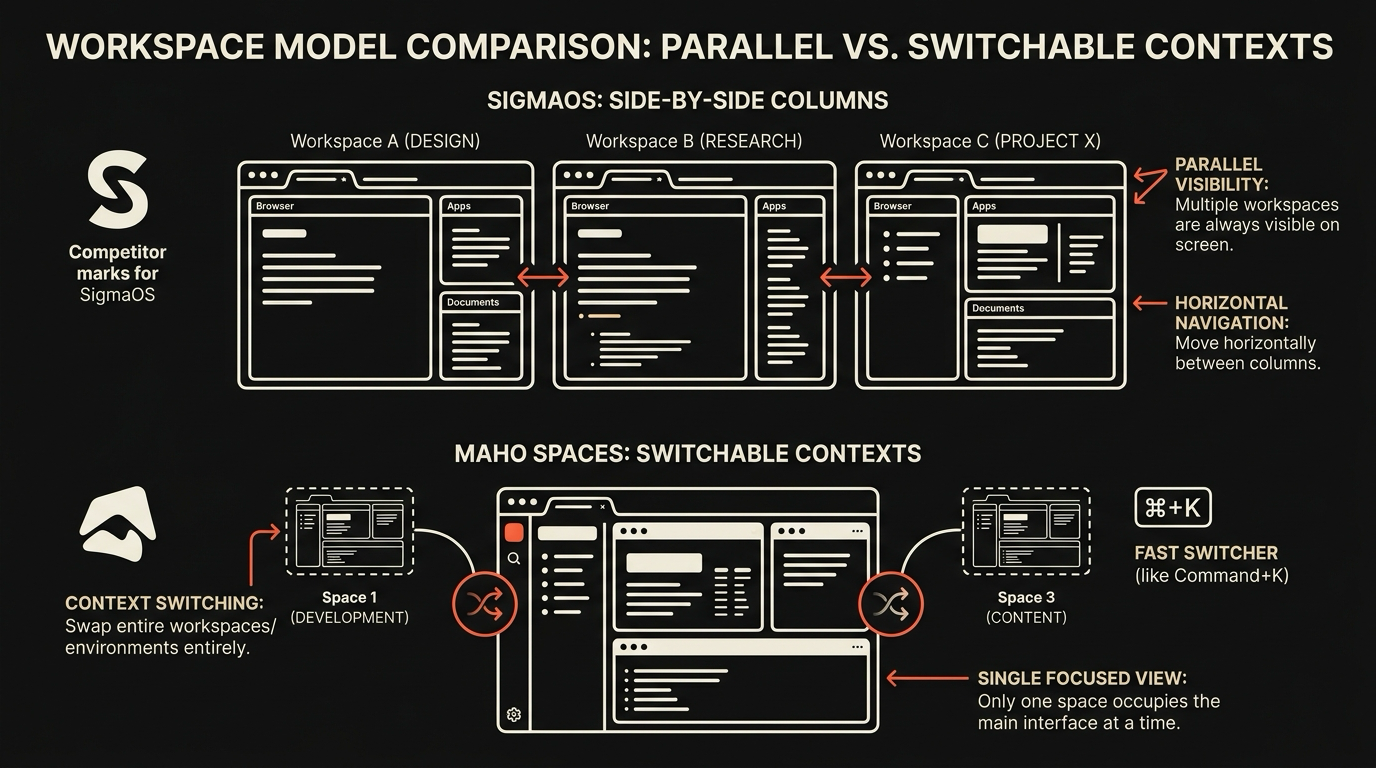
Net read. SigmaOS workspaces are better for visual organization and split-view ergonomics. Maho Spaces are better when the assistant is doing work, because the agent’s reach is scoped the same way the tabs are. Different ceilings, different goals.
AI integration comparison
Section titled “AI integration comparison”Both products ship some form of AI. The shapes diverge.
| Capability | SigmaOS | Maho | |---|---|---| | Side panel chat | Yes | Yes | | Page summary | Yes | Yes | | Tool use (browser actions) | Limited | Yes, nine built-in tools | | Custom MCP servers | No | Yes, registry plus local URL | | Model choice (BYOK) | Vendor-managed | BYOK by default, vendor optional | | Permission gate per call | Coarse | Per-tool, per-origin, per-session | | Audit log | Not user-facing | Local, queryable |
SigmaOS’s AI is solid for the common cases: ask the page, summarize, fix a paragraph. The integration is tight with the chrome. The model choice is the vendor’s choice. The “what tools can it call” question has a short answer.
Maho’s AI is the long answer. Tool calls are first-class. The model is yours by default. The permission system is granular enough that an agent can be useful without becoming a security event. A user who wants chat-with-page is fine on either browser. A user who wants the browser to do real work in a controlled way is on Maho.
The BYOK row is the one that surprises most evaluators. SigmaOS routes prompts through a vendor-managed cloud. Maho routes prompts through the endpoint you configure. If your team has a contract with an LLM provider already, Maho uses that contract. If your team has a hard rule against shipping prompts to a third party that is not on the approved vendor list, Maho is the browser that can satisfy the rule. SigmaOS, in its current shape, cannot.
For the wider matrix across other browsers, see the comparison hub.
Pricing comparison
Section titled “Pricing comparison”This is where the two products diverge most cleanly.
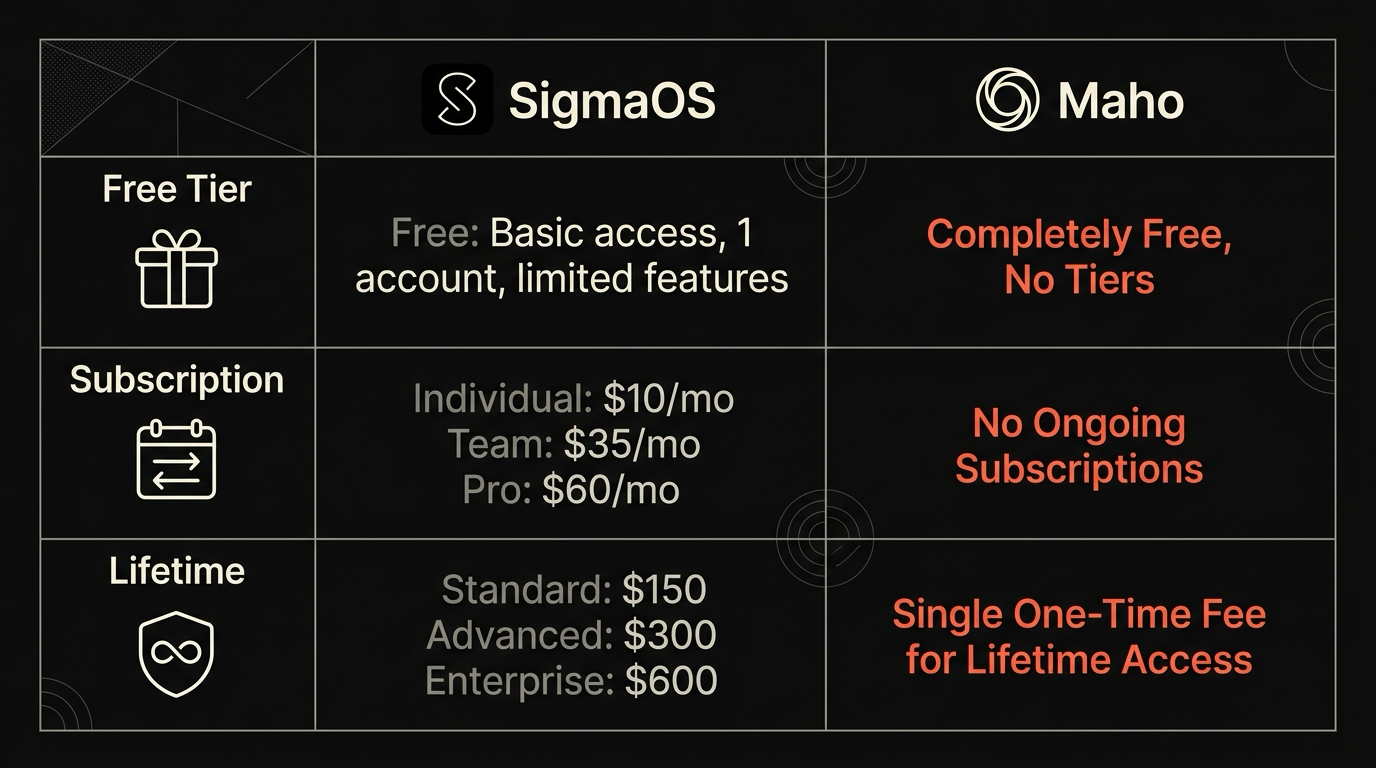
SigmaOS has a paid Pro tier. The free version is capped at a small number of workspaces and excludes the deeper AI features. The Pro tier unlocks unlimited workspaces, the better AI, and the team features. The price is a recurring monthly subscription.
Maho is free forever. There is no Pro tier, no paid AI add-on, no team plan with a paywall. We use BYOK, so when you want a frontier model the user pays the model provider directly. We do not sit between you and the model with a margin. Maho itself does not gate features behind a tier. See pricing for the long form.
Two different revenue bets. The user-side experience is one tier vs two. If you have ever bounced off a power browser because the feature you wanted lived behind a Pro toggle, this difference is the one that matters.
Pick guide
Section titled “Pick guide”A short matrix.
- You want a Mac-native browser with a consistent design opinion and a strong split-view: SigmaOS.
- You want a Mac-native browser with an agentic AI you control end to end: Maho.
- You live in the keyboard and rarely care about AI: either, with a slight nod to SigmaOS.
- You care about per-tool permissions and BYOK: Maho.
- You like paying for software because you want a clean product without strings attached: SigmaOS.
- You want zero paywalls and bring-your-own-model: Maho.
There is no overlap question that is settled by this matrix. The point is to make the decision fast. If both products land on your shortlist, the deciding axis is almost always either “design opinion” or “agent control”. Pick the one that fits your week, not the one with the better landing page.
Join the waitlist
Section titled “Join the waitlist”Maho is a pre-release agentic browser for macOS with native Spaces, BYOK, and zero telemetry by default. No Pro tier, no paid AI add-on. Join the waitlist.