
BYOK in the browser: the architecture, in detail
Most browsers that ship AI ship a single provider. The vendor picks the model, the vendor pays for the tokens, the vendor sees the prompts. BYOK changes the contract. You bring the key. You pick the model. You pay the provider directly. The browser stays out of the middle.
This post is the architecture behind that sentence. The endpoints we accept, where keys live, how prompts route, what happens on a retry, and what the browser never sees. If you only want the short version, skip to the last section.
Why BYOK is the default, not a checkbox
Section titled “Why BYOK is the default, not a checkbox”Local-first databases benefit from hardware-backed security. For database security, see the SQLite Encryption Extension.
A lot of AI features get bolted on top of a vendor-hosted model. The vendor handles billing, key rotation, abuse detection, and rate limits. From a product team’s perspective, that is the cheap path. The user types, the SaaS pays the inference bill, the SaaS sees every prompt.
We did not want that shape. The reasons stack:
- The browser sees a lot of sensitive context. Tabs, page content, sometimes form data. Sending all of that through a vendor’s middleman is a privacy posture, not just a routing choice.
- Token markups are real. Bundled AI is rarely cheaper than going to the provider directly, and the markup is invisible.
- Local models exist. If you have an M-series Mac, you can run a small model on the same machine and pay nothing per token. A bundled architecture cannot reach that endpoint.
- Models change every six weeks. Locking the user into one vendor’s choice ages badly.
So BYOK is not the AI tier above the bundled tier. It is the only tier. The AI panel is built around the assumption that the model lives somewhere you control, and the browser is a thin client.
Endpoint shapes we accept
Section titled “Endpoint shapes we accept”OpenAI-compatible schema
Section titled “OpenAI-compatible schema”We support standard OpenAI chat completion schemas for local and hosted endpoints.
Custom LLM adapters
Section titled “Custom LLM adapters”Custom adapters allow routing prompts through arbitrary API formats.
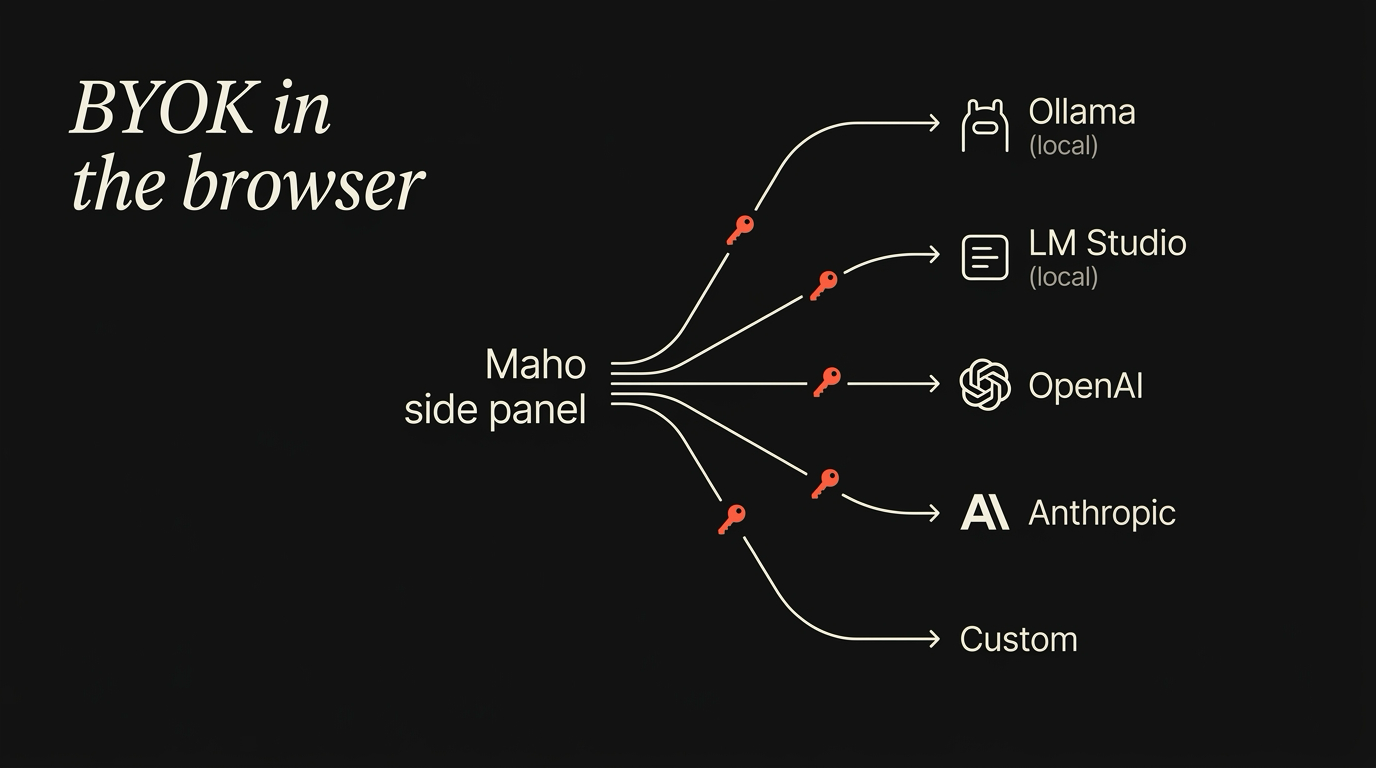
The provider field in Settings takes one of five shapes. Each one expects a real public URL or a localhost endpoint and a key, if the endpoint needs one.
OpenAI-compatible. This is the broad bucket. Any endpoint that speaks the OpenAI Chat Completions API at /v1/chat/completions works. That covers OpenAI itself, OpenRouter, Together, Groq, Fireworks, and most open inference servers. You paste a base URL, a model name, and a key. We send standard chat-completions requests with stream: true.
Anthropic. First-party support for the Anthropic Messages API. Different request shape, different streaming format, different tool-call schema. Worth a separate provider entry because the wire format differs enough that mapping it through OpenAI-compat would lose features.
Ollama. Ollama exposes both a native API and an OpenAI-compatible endpoint at http://localhost:11434/v1. The Ollama provider entry defaults to localhost and skips the key field, since a local server does not need one. We document the setup in the Ollama tutorial.
LM Studio. LM Studio’s local server speaks OpenAI-compatible at http://localhost:1234/v1. Same shape as the Ollama entry, different default port.
Custom. A free-form provider entry. Base URL, optional headers, key, model name. For people running llama.cpp directly, vLLM, a corporate gateway, or a homemade endpoint that speaks OpenAI-compatible. We do not validate the response schema beyond required fields, on purpose. If you can speak the protocol, we trust the bytes.
The provider list is not exclusive. You can register more than one and pick which one a given task uses, which is what the routing section is about.
Where keys live
Section titled “Where keys live”Keychain access controls
Section titled “Keychain access controls”On macOS, credentials are protected by the OS keychain. Read about the Apple Keychain Services API for details.
SQLite credential storage
Section titled “SQLite credential storage”Only encrypted references are stored in the local SQLite file. We utilize the Chromium OSCrypt Source implementation for secure platform-dependent encryption.
Every key you paste lives in the macOS Keychain. Not in a config file, not in localStorage, not in a cloud sync bucket, not in a vendor backend. Keychain.
The mechanics are mundane and that is the point. Each provider entry stores its key under a service name like app.maho.byok.openai with the account name set to the provider entry id. Reads happen at the moment the request is made, in the network process, and the key is held only long enough to add an Authorization header. After the request finishes, the in-memory copy is dropped.
Three things follow from that:
- The key is gated by the macOS user session. If your account is locked, the AI panel cannot read the key.
- The key never enters Maho’s sync relay. Sync moves tabs, history, and Spaces. It does not move keys. We do not want them in the relay even if it is end-to-end encrypted, because the smaller the secret surface, the smaller the blast radius.
- You can audit the key with
security find-generic-password -s app.maho.byok.openai. The system tools work because we use the system store. Nothing is custom here.
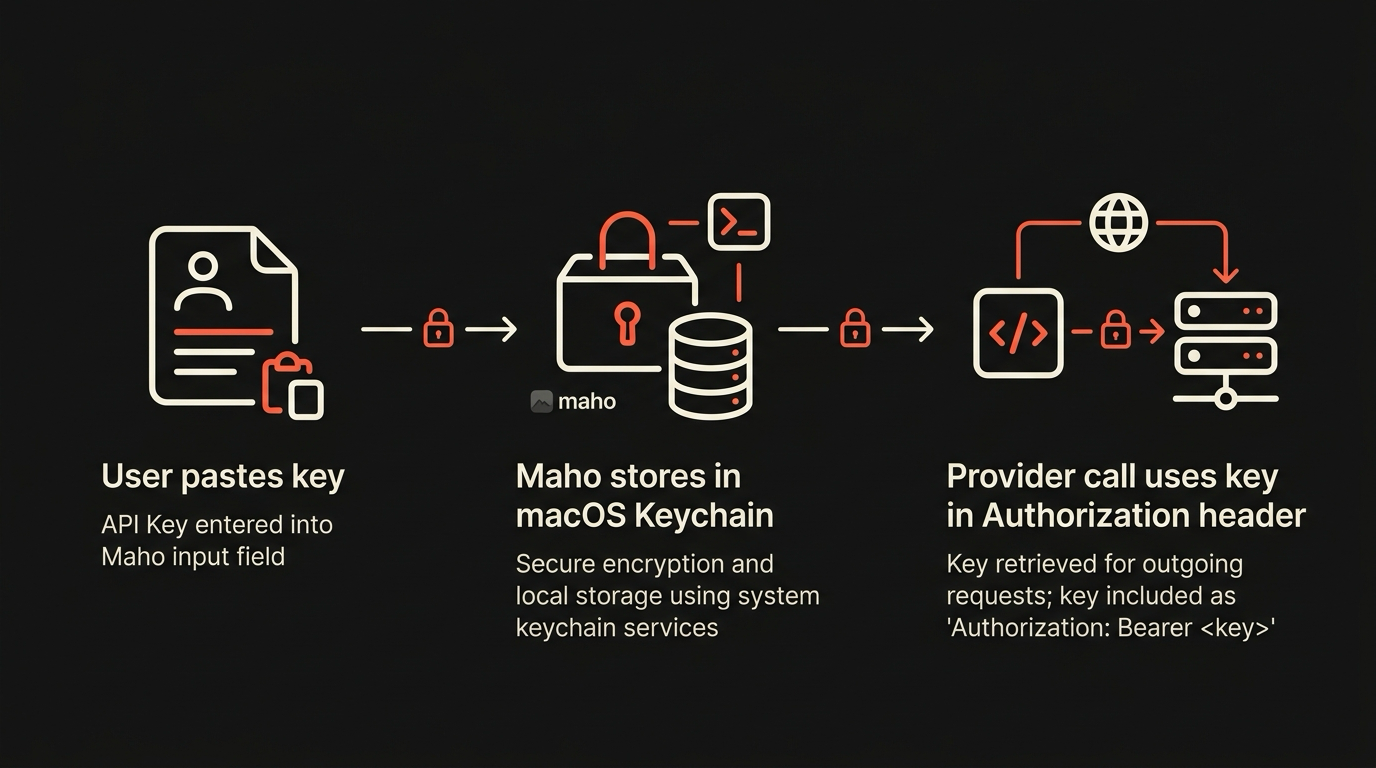
If you ever want to revoke a key, you can do it three ways. Delete the provider entry in Maho. Delete the Keychain item with security delete-generic-password. Or rotate it at the provider’s dashboard. Any of the three closes the loop. We document the third path because it is the safest one when a key is suspected leaked: rotation at the source invalidates copies you do not know about.
Routing: which prompt goes to which provider
Section titled “Routing: which prompt goes to which provider”You can register more than one provider. The next question is which one gets the prompt. The routing logic is small on purpose.
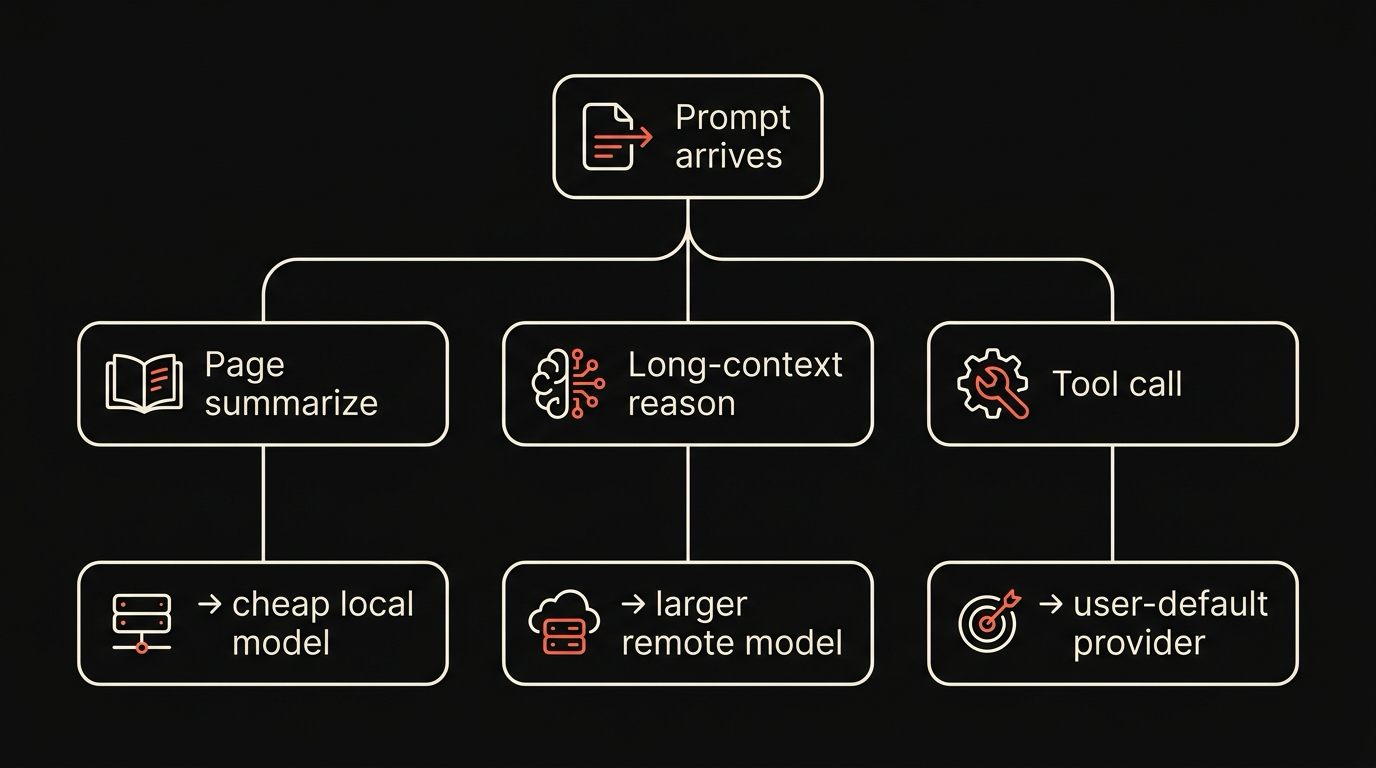
A prompt has three signals: the operation type (chat, summarize, tool-call, embedding), the active tab origin, and an optional explicit override. The router walks the rules in order and picks the first match. The default rule set is short:
- If the user picked a provider in the side panel, use that one. Always wins.
- If the operation is
embedding, use the embeddings-capable provider. Most tasks do not need this path. - If the operation is
tool-call, prefer providers that advertise tool-use support. Anthropic and most OpenAI-compatible endpoints do. Local models often do not, so they fall through. - Otherwise, use the default provider for the workspace.
There is no model auto-selection beyond that. We do not silently route long contexts to a different model, and we do not split a prompt across providers. If you want a different model for a specific task, you pick it in the panel. The router does not get clever, and that is the property we want: predictable bills, predictable latency, predictable privacy posture.
Streaming, retries, fallbacks
Section titled “Streaming, retries, fallbacks”Every AI call goes out as a streaming HTTP request. The panel renders tokens as they arrive. The streaming wire format depends on the provider: OpenAI-compatible uses Server-Sent Events with data: lines, Anthropic uses its own event types, Ollama matches the OpenAI-compatible flavor on its v1 endpoint. We map all three into a single internal token stream so the UI does not care.
Retries are conservative. A network error inside the first 200ms of a request retries once. A 429 with a Retry-After header waits and retries once. A 5xx retries once with a 500ms back-off. Anything else surfaces as an error in the panel with the provider’s response body shown in a collapsible block, so you can see exactly what came back.
Fallback between providers is opt-in and off by default. You can mark one provider as primary and another as fallback, and the panel will switch on a hard error. We default it off because silent fallback hides bills and changes the privacy surface without telling you. If you want the panel to fall back from a local model to a cloud one when the local one fails, you turn it on, and the panel labels every cloud-served message with a small badge so you can see when it happened.
What the browser never sees, and how you verify
Section titled “What the browser never sees, and how you verify”Three things the browser, and we as the team behind it, never have:
- Your prompt content. Prompts go from the panel to your provider over a TLS connection that the browser opens. We do not proxy through a Maho server. There is no middle hop.
- Your model output. Same path, in reverse. Tokens stream from the provider to the panel.
- Your API key, in any form that leaves your machine. The key sits in Keychain, gets read into a request header, gets dropped from memory. Sync does not touch it.
You should not take any of that on faith. The verification path is short:
- Open Activity Monitor or
lsof -i -Pwhile the panel is talking to a provider. The connections you see are to the provider host, not to a Maho host. - Use Little Snitch or the macOS Network Extension API to log every outbound connection from the browser process. The only AI-related destinations are the providers you configured.
- For local-only setups, you can put the machine on a captive Wi-Fi or unplug Ethernet entirely. A panel pointed at a local Ollama keeps working. A panel pointed at OpenAI fails with a clear network error. The fact that one works and the other does not, with no fallback in between, is the experiment.
- If you want belt-and-braces, run the network process under
tcpdumpor in a Wireshark session. The provider hostnames and ports are the only AI destinations.
The browser’s job in this architecture is small: hold the panel UI, manage the Keychain entries, format the request, render the stream. Everything that costs money, processes your text, or holds long-term state is on the provider side or on your local machine. We like that division. It is the property the rest of the privacy posture rests on.
Download Maho
Section titled “Download Maho”Maho is available now. The BYOK panel and provider settings are documented in browser AI. Download Maho.