
Maho vs Chrome with Gemini: agentic-first vs AI-bolted-on
Google ships Gemini inside Chrome. Maho ships an agentic side panel built around BYOK. The two AIs solve overlapping problems with different shapes, different invocation paths, and different views of what is happening on your screen.
This post sets the two side by side. It is not a verdict. It is a description of where each AI is invoked, what it can do, and what it sees. The right pick depends on the work you do.
Chrome’s Gemini placement, in context
Section titled “Chrome’s Gemini placement, in context”Google has been wiring Gemini into Chrome through 2025 and 2026, in stages. The visible surfaces today are roughly four:
- The address bar (omnibox). Type a question that looks more like a query than a URL, and Gemini answers inline with an AI-generated summary above the standard results. This is a server-side feature; the prompt and the originating page URL go to Google.
- Help me write. A right-click menu item on text fields that drafts or rewrites text using Gemini. The selected text and a small amount of surrounding page context go to Google.
- Tab summarization. A button that asks Gemini to summarize the current page. The page contents are sent to Google for processing.
- Side panel chat. A Gemini chat surface in the side panel that can read the active tab on request, pull a summary, or answer a follow-up.
Gemini in Chrome is, today, primarily a chat assistant. It draws on Google’s models and Google’s infrastructure. Tool calling exists in Gemini the model and on Vertex AI the platform. It does not exist in Chrome the browser. The browser does not let Gemini open tabs, click buttons, or call MCP servers. It lets you ask Gemini questions about what is on screen.
The pricing posture is bundled. There is a Gemini Advanced tier sold under the Google One subscription. Free Chrome users get the smaller models; paid Google One users get the larger ones. The browser team curates which models are available and which surfaces they appear in.
This is a fair design. It is the design of a hosted AI front end. The tradeoffs come from the bundle, not from the engineers.
Maho’s side panel, in context
Section titled “Maho’s side panel, in context”Maho is a Chromium-based browser available for macOS, Windows, and Linux. The AI surface is one panel on the right side of the window, opened with Cmd+Shift+L. The panel is the same in every tab and in every Space. It is a control surface, not a tab decoration.
The panel speaks to whichever provider you configured. OpenAI, Anthropic, an Ollama instance on localhost, an LM Studio server, or any custom HTTP endpoint that speaks the OpenAI-compatible shape. Keys live in macOS Keychain. We do not host inference, we do not curate models, and we are not in the network path between your prompt and your provider.
The panel is agentic. It can chat. It can also call tools. The built-in tools cover the common browsing actions (open, close, switch, fetch). User-supplied MCP servers cover everything else. Each tool call goes through the permission gate before it runs.
There is no paid tier and no managed service. The cost of the prompts is the cost your provider charges you, paid directly. Maho does not bill anyone.
Invocation comparison
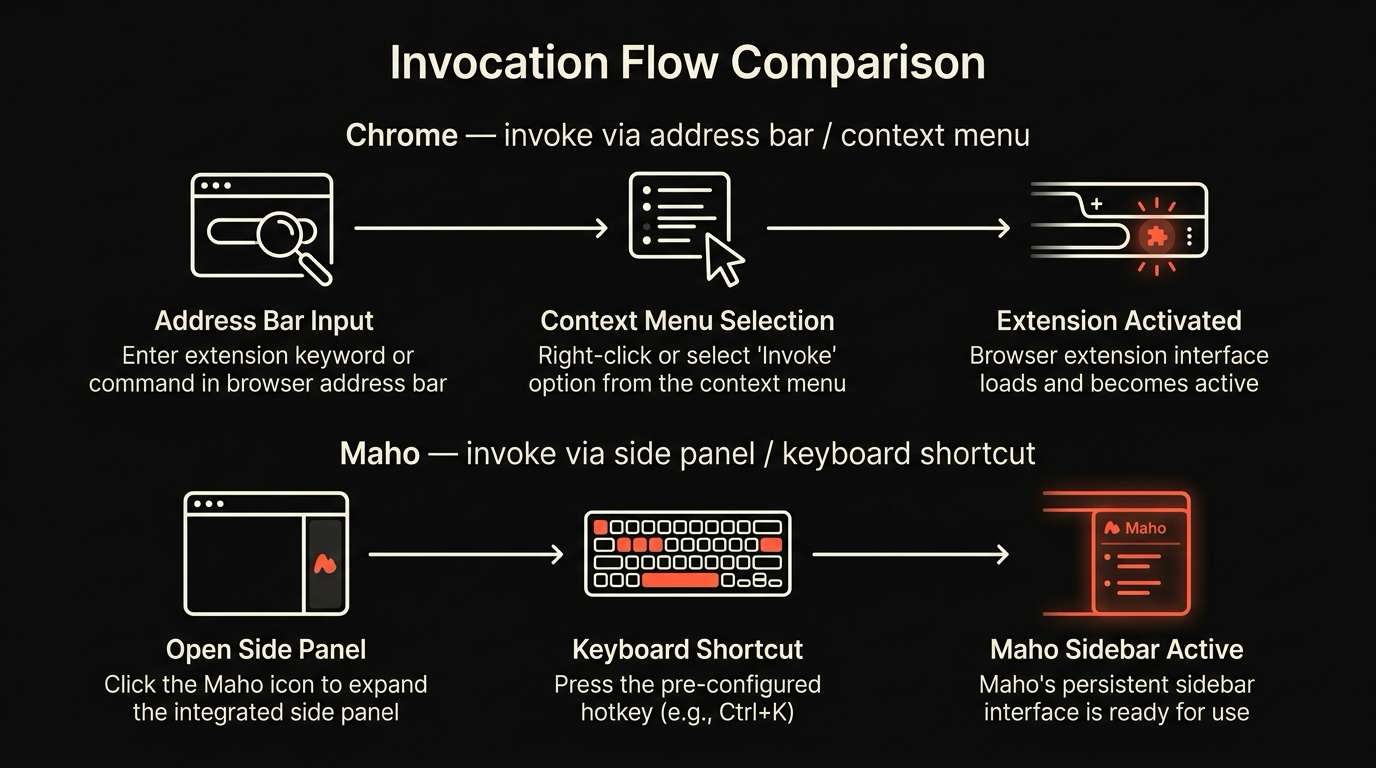
Section titled “Invocation comparison”Where you trigger the AI matters as much as what the AI can do. Chrome and Maho place the trigger in different places.
In Chrome, the AI is everywhere. The omnibox surfaces an AI summary on the way to a search result. The right-click menu offers AI rewrites on any selected text. The summarize-tab button sits next to the URL. The side panel hosts a chat. Each invocation is a different surface with a different shape, and the user picks the surface based on the task.
In Maho, the AI is one panel and one shortcut. Cmd+Shift+L opens the side panel. Everything happens there. There is no inline omnibox AI, no right-click rewrite menu, no per-tab summarize button. The bet is that one durable surface beats four inconsistent ones, and that the cognitive overhead of “which AI do I trigger here” is real.
Both bets are reasonable. Chrome’s bet is that AI is a mode you slip into for thirty seconds and slip back out of. Maho’s bet is that AI is a workspace you keep open while you work. The bets give different rhythms.
Tool-call comparison
Section titled “Tool-call comparison”This is where the two products diverge most.
Chrome’s Gemini integrations are, in 2026, primarily read and explain. The AI sees the page, sees your selection, and produces text. It does not perform browser actions on your behalf. It does not file tickets. It does not call a calendar API. It does not coordinate across tabs. The model is capable of these things on Vertex AI; the Chrome surface does not expose them.
Maho’s panel ships with tool calling on by default. The built-ins handle browser actions:
open_tab,close_tab,switch_tabfetch_urlfor HTTP GETs through the active sessionread_pagefor the active tab’s DOM and text- A small set of search tools
User-supplied MCP servers add anything else. A Linear MCP server lets the panel file an issue. A calendar MCP server lets the panel check your week. A custom server you wrote lets the panel call into your own systems. Every tool call goes through the per-tool, per-origin, per-session permission gate covered in the permission model post.
A short comparison:
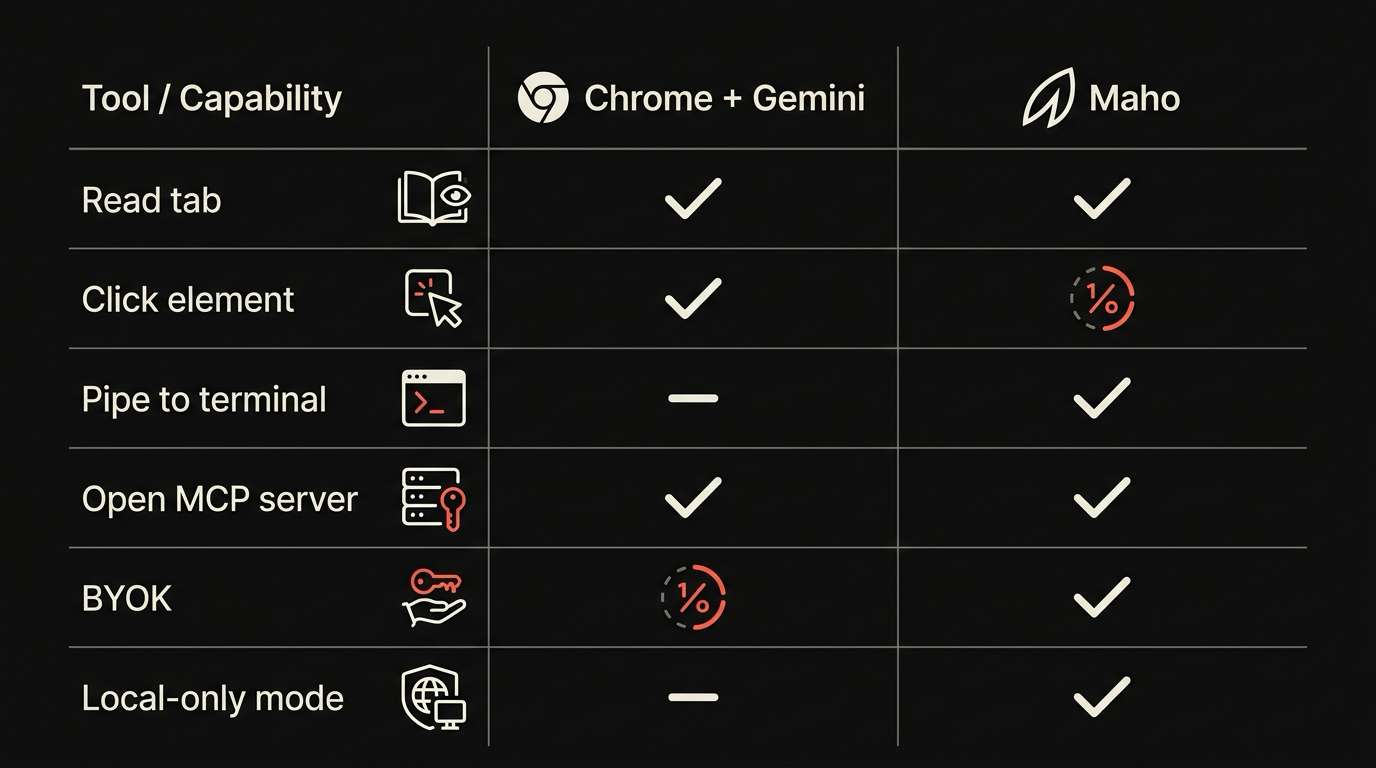
| Capability | Chrome with Gemini | Maho |
|---|---|---|
| Page summarization | Yes | Yes |
| Page question and answer | Yes | Yes |
| Inline rewrite (text fields) | Yes | Not yet |
| Cross-tab context | Limited to the active tab | Yes, scoped to a Space |
| Built-in browser tools | No | Yes |
| MCP server registration | No | Yes |
| Tool-call permissions | Not applicable | Per tool, per origin, per session |
| BYOK | No | Yes |
| Local model support | No | Yes via Ollama or LM Studio |
The honest version: if your AI work is “summarize this page” and “rewrite this paragraph”, Chrome is enough. If your AI work is “research three sources, summarize, file the result as a Linear issue”, Chrome stops short of the last step. Maho is built for the last step.
What each AI sees
Section titled “What each AI sees”Privacy posture follows from where the inference runs.
Chrome with Gemini routes prompts through Google’s infrastructure. Page contents, selected text, and surrounding context go to Google when you invoke the AI. Google’s privacy policy applies. Conversation history is stored against your Google account when you are signed in. Google has stated that consumer Gemini activity may be reviewed for safety and quality and is not used for advertising. Free-tier and paid-tier policies differ in retention windows.
This is not a criticism. Google publishes the policy, and it is consistent with how a hosted AI service works. The browser is the front end of a managed service.
Maho’s panel routes prompts to whichever provider you configured. If you point it at Ollama on localhost, prompts never leave the device. If you point it at OpenAI with your own key, prompts go to OpenAI under your account, OpenAI’s policy applies, and Maho is not in the path. If you point it at LM Studio, the inference runs in LM Studio on your Mac.
| Dimension | Chrome with Gemini | Maho |
|---|---|---|
| Inference location | Google infrastructure | Your provider, including localhost |
| Vendor sees prompts | Provider you configured | |
| Browser vendor sees prompts | Yes (Google is the browser vendor) | No, Maho is not in the path |
| Account required | Yes for signed-in features | No |
| Conversation history | Tied to Google account | Local SQLite, encrypted at rest |
| Telemetry default | Opt-out, anonymized | Off |
Two things are worth saying plainly. Chrome’s “Google sees the prompts” is not a bug; it is the design of a hosted AI. Maho’s “Maho is not in the path” is not a moral claim; it is what happens when the browser does not host inference.
Pick guide
Section titled “Pick guide”Pick Chrome with Gemini if you want a curated AI experience with no setup, you are already in the Google account ecosystem, your work is summarize and rewrite, and you trust Google’s choices about which model runs where. The bundle is the feature.
Pick Maho if you want the AI to use your model and your keys, you want the panel to take action and not only chat, you want a single durable surface instead of four inline triggers, and you want the browser to stay out of the path between your prompts and your provider.
There is no third option where one product is correct for everybody. Chrome is a managed AI front end with a long pedigree. Maho is a transport layer for an AI stack you assemble. The right pick depends on whether you want a curator or a workshop.
For the wider hub of comparisons, see the compare page. For the longer Maho-side description of what the panel actually does, see browser AI.
Download Maho
Section titled “Download Maho”If the agentic-first, BYOK posture is the one you want from a 2026 browser, we built it. Download Maho.
For a broader overview of how Maho stacks up against other AI-forward browsers, see our 2026 agentic browser comparison.