
Maho vs Edge with Copilot: the bundle vs the BYOK
Edge is the only major-platform browser that ships an AI assistant bundled by default. You install Edge, you get Copilot. There is no separate setup, no key to paste, no model to pick. Microsoft picks. Microsoft pays. Microsoft sees the prompts.
Maho takes the opposite call. The browser is the host. The model is yours. You bring the key, you pick the provider, you pay the provider directly. The browser stays out of the middle.
This post is the side-by-side. It is not a takedown of Edge. Microsoft made a coherent product choice. It is a different choice, and the differences land on the user. Worth knowing which set of trade-offs you are signing up for.
The Microsoft offer in plain terms
Section titled “The Microsoft offer in plain terms”Edge is Chromium-based, polished, and tightly integrated with the rest of Microsoft 365. Copilot lives in the side pane and on the toolbar. By default it can read the open page, summarize it, draft on top of it, and answer follow-up questions. Some Copilot features are free. Some require a Microsoft account, an enterprise tenant, or a paid Copilot subscription.
The selling point is zero setup. A user who has never thought about LLMs gets a competent AI assistant the moment they open Edge. The model is selected by Microsoft. The compute lives on Microsoft Azure. The conversation history is persisted in the user’s Microsoft account if they sign in.
For a person who wants AI in a browser without learning anything new, this is a strong product. The button is there. It works. It does not need to be configured. That is a real advantage and worth naming up front.
The trade-offs are the rest of this post.
Where Copilot routes prompts
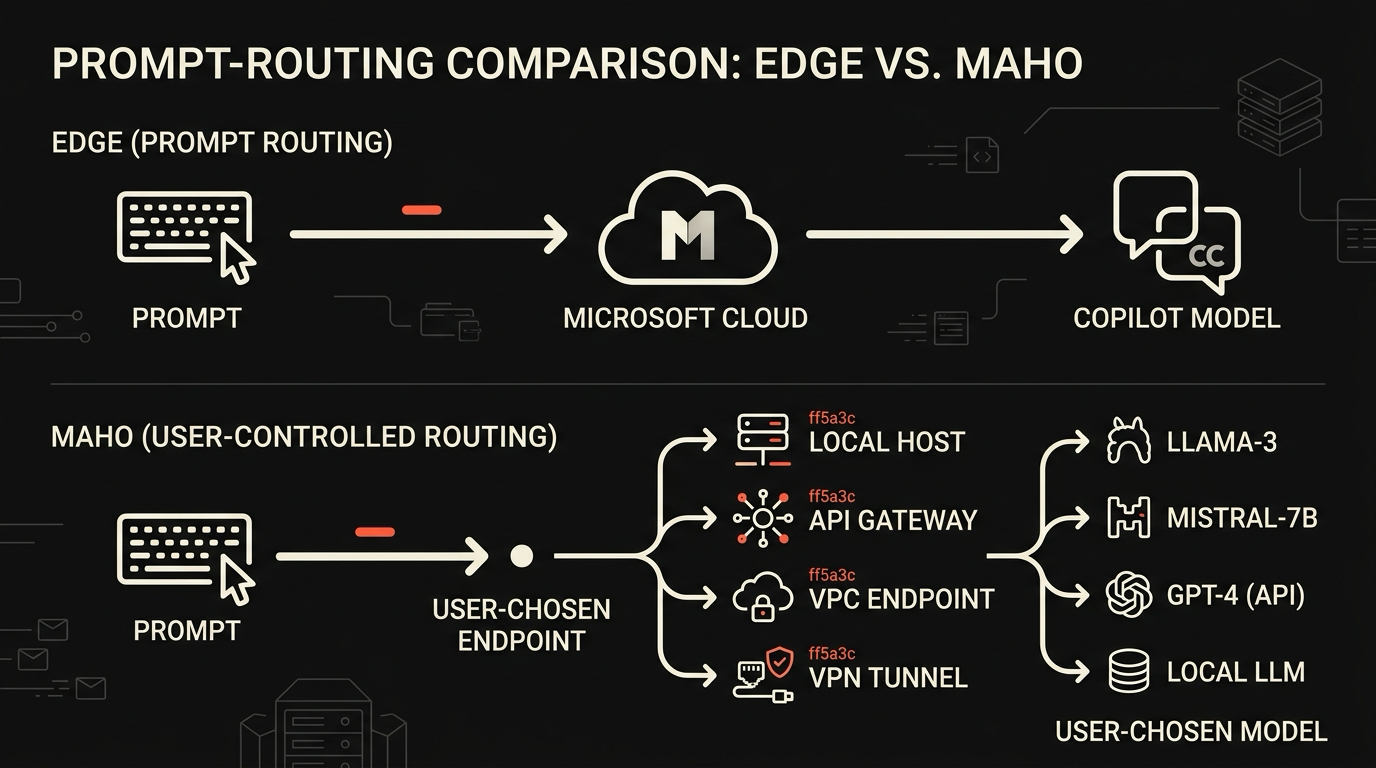
Section titled “Where Copilot routes prompts”When you type into Copilot, the prompt leaves your machine and goes to Microsoft servers. Microsoft is clear about this in their documentation. The prompt is processed by a model Microsoft picked, on infrastructure Microsoft runs, under Microsoft’s data-handling policies.
For consumer accounts, the default Copilot experience pools data with other product telemetry under Microsoft’s privacy notice. For enterprise tenants on a paid Copilot plan, Microsoft offers commercial-data-protection terms that change the retention story, but the routing is the same. The prompt goes to Microsoft. The response comes back from Microsoft.
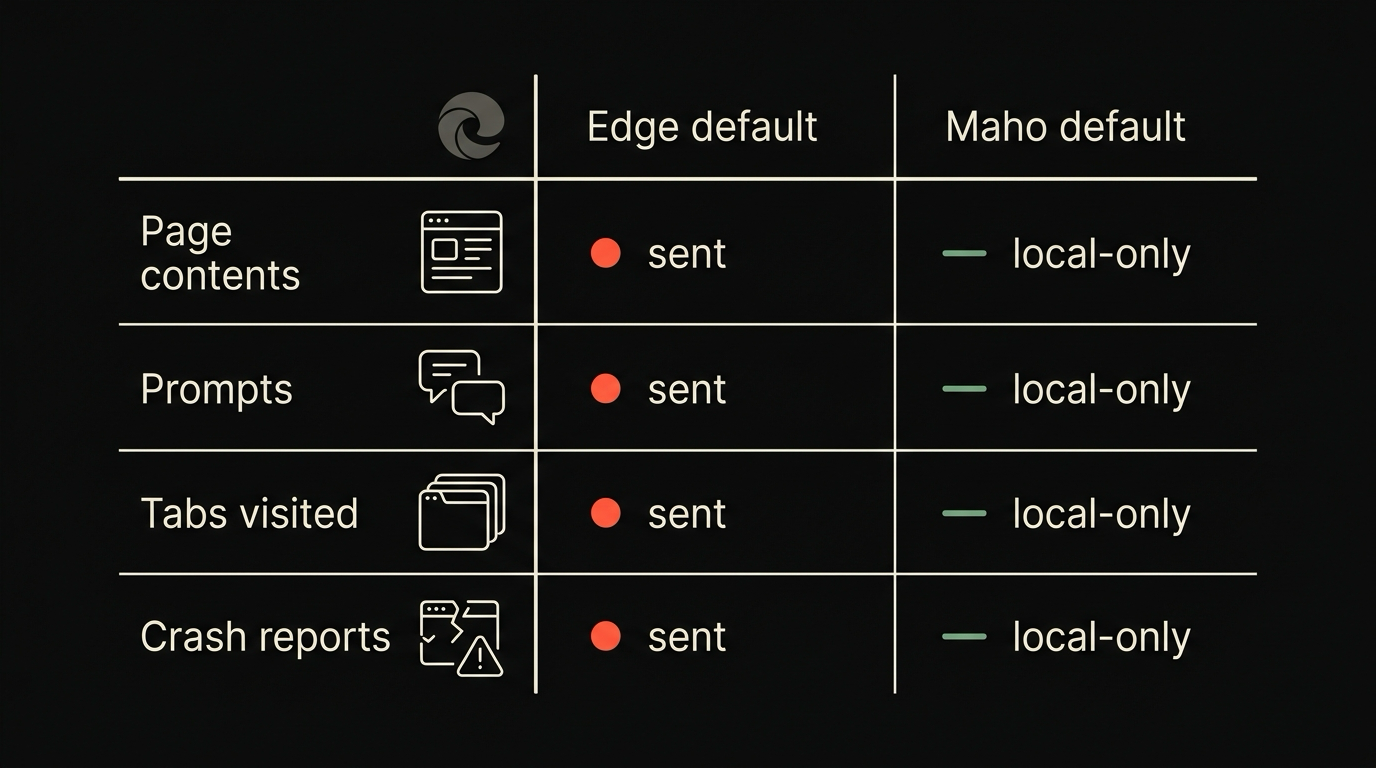
The active page can also be sent. When you ask Copilot about the current tab, the page contents go up the wire so the model can read them. This is true of any browser-AI integration that reads the page, but it is worth being explicit. The page leaves your machine. So does any text you typed before sending it.
Browsing telemetry is a separate stream. Edge collects diagnostic and usage data by default. The level can be lowered in settings. It cannot be turned off entirely on the consumer build.
This is not a privacy scandal. It is the standard shape of a vendor-bundled assistant. The work happens on the vendor’s servers. The vendor sees what they need to see. The user gets a button that works.
The Maho BYOK alternative
Section titled “The Maho BYOK alternative”Maho takes the BYOK route. You configure a provider in Settings: an OpenAI-compatible endpoint, Anthropic, Ollama, LM Studio, or a custom URL. You paste a key, if the provider needs one. The browser stores the key in the macOS Keychain and reads it only at the moment a request fires.
When you talk to the side panel, the prompt goes from your machine to the provider you configured. Not through Maho. There is no Maho server in the middle. We do not see the prompt, we do not see the response, and we do not log the round-trip on our infrastructure.
This is a less polished default experience. You pick a provider. You bring a key. If you want a local model, you install Ollama or LM Studio and point Maho at it. The setup takes a few minutes the first time and then disappears.
What you trade for that setup cost is a different posture. The model is yours. The provider is the one you chose. The bills go to the account you control. If you switch providers, you change the dropdown and the next prompt goes elsewhere. None of those moves require us, and none of them produce a record on our side.
The full architecture is in the BYOK explainer and the browser AI docs. The relevant part for this comparison is that BYOK is not a tier. It is the only path.
Side by side on routing, agency, and telemetry
Section titled “Side by side on routing, agency, and telemetry”The two products land in different places on every axis that matters once you start using them as your daily browser.
| Axis | Edge with Copilot | Maho | | --- | --- | --- | | Engine | Chromium | Chromium | | AI provider | Microsoft, fixed | OpenAI-compatible, Anthropic, Ollama, LM Studio, custom | | Prompt routing | To Microsoft Azure | Direct to your provider | | Page contents | Sent to Microsoft when AI reads the page | Sent to your provider when AI reads the page | | API key location | Microsoft account | macOS Keychain on your machine | | Local model option | None | Ollama, LM Studio, llama.cpp, vLLM | | Conversation history | Microsoft account when signed in | Local SQLite, on-device | | Tool calling | Vendor-defined surface | Built-in tools plus user MCP servers | | Permission model | Toggle in Settings | Per-tool, per-origin, per-session | | Browser telemetry | On by default, can be lowered | Off by default | | AI telemetry | Microsoft sees prompts | We do not see prompts | | Account required | Microsoft account for full features | None |
A few rows deserve a sentence of context.
On agency, Edge gives you a Copilot that is good at the tasks Microsoft scoped for it. Maho gives you a panel that calls tools, with a permission gate around every call. The Maho panel can do more by composition. The Edge panel does less, more polished, on rails Microsoft chose.
On telemetry, Edge has a configurable level. The lowest level still ships some diagnostic data, the way the consumer Windows installs do. Maho ships zero by default. The crash-report channel is opt-in.
On portability, the Microsoft assistant moves with your Microsoft account. The Maho setup moves with your provider keys, which live in your Keychain and are not tied to a Maho identity. There is no Maho identity.
Migration notes
Section titled “Migration notes”If you are coming from Edge, three things will feel familiar and one will be different.
Familiar: the engine. Maho is Chromium-based, the same way Edge is. The MV3 extensions you use carry over, the keyboard shortcuts that come from Chromium carry over, and the bookmarks and history import path is standard.
Familiar: the side panel. The shape of “AI lives in a pane on the right” is the same. The keystrokes are similar. The reading-aloud and summarize buttons exist on both.
Familiar: the polish floor. Both products are designed for daily use, not for hobbyist tinkering. The defaults work.
Different: the first-launch experience. Edge has Copilot ready the moment you open the browser. Maho asks you to pick a provider before the panel does anything useful. If you have a local Ollama running, that takes about two minutes. If you do not, the BYOK setup is the part that takes a coffee.
If you want a longer side-by-side against more of the 2026 lineup, the comparison hub covers Maho against Chrome with Gemini, Brave with Leo, Opera with Aria, and a few more.
Pick guide, in two sentences. Choose Edge with Copilot if you want a competent AI button that someone else maintains, and you are inside the Microsoft ecosystem already. Choose Maho if you want the model and the keys to be yours, and you are willing to spend three minutes on setup to get there.
Join the waitlist
Section titled “Join the waitlist”Maho is in pre-release for macOS. BYOK ships in the first build. If the prompt-routing and telemetry rows above match what you want, the next step is the waitlist.